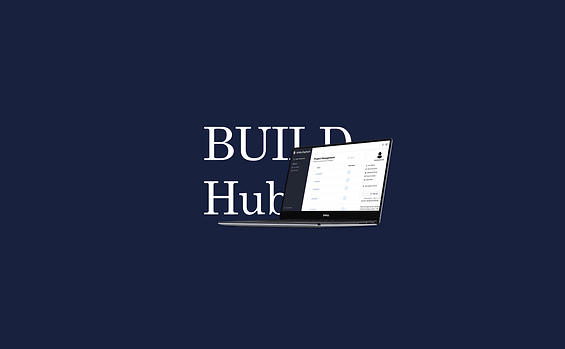
BUILDHUB
Timeline
4 MONTHS
Role
FRONT-END DESIGNER & DEVELOPER
Type of Work
SOFTWARE ENGINNERING
DESIGN PROJECT
Construction site safety incidents are rising, worsened by COVID-19, which limits on-site inspections. A labor shortage further challenges manual monitoring. As a front-end designer and developer, I worked with my team to build an online hub integrating automated obstacle extraction and project management to enhance safety and efficiency. This solution addresses workforce constraints while ensuring functional integrity, enabling teams to monitor, manage, and reduce risks remotely.
"SafeBuild" 🏗️ turned scattered construction site monitoring into a single platform, combining automated obstacle detection and project management tools, ensuring every project stays organized and on track.
CHALLENGE
Project Overload
01
Numerous projects make it hard for users to manage and collaborate.
02
Users struggle with safety issues due to manual terrain checks.
03
Users find it hard to quickly locate the target project due to complex project hierarchy.
UNDERSTANDING USER REQUIREMENTS
The website is designed for company staff and includes obstacle detection and project management features. Based on academic research and industry surveys, we’ve identified the following user needs:
Functional | Nonfunctional |
|---|---|
Users can create projects | Easy to maintain and well-structured site |
Users can create subprojects based on a project | Simple and easy-to-use web interface design |
Users can preview a project’s documents online | The website can be browsed and operated simultaneously by more than 100 |
Users can upload documents for a project | |
Users can upload images for a project to extract obstacles | |
Users can search for a project based on title, description, or document content | |
Users can calculate the critical path of a project |
USE CASE
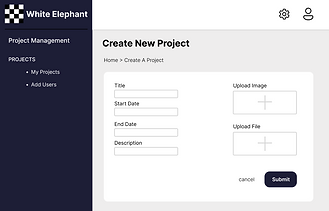
Continuing from the user needs analysis, we delved into a use case diagram to better understand how these needs can be addressed through specific scenarios or solutions. Users are able to create a new project (subproject), or delete, edit, view, search for the existed project (or subproject), and utilize image recognition.

"A clear and easy-to-use project management tool can improve employee productivity."
CLEAR AND STRUCTURED



CHALLENGE
Inspection Risk
01
Numerous projects make it hard for users to manage and collaborate.
02
Users struggle with safety issues due to manual terrain checks.
03
Users find it hard to quickly locate the target project due to complex project hierarchy.
PROBLEM
According to ILO estimation, at least 60,000 fatal accidents take place at construction sites all over the world each year. A significant number of construction industry workers suffer injuries (17%) and deaths (25%-40%) each year.
SOLUTION
-
Designing an online obstacle detection technique, eliminating the risks of manual inspection.
-
Adding obstacle detection technique to project management hub, making it easier to use.
"Online obstacle detection tool reduces the risk of errors or overlooking potential obstacles, ensuring the safety of workers."
OBSTACLE EXTRACTION IMPLEMENTATION
Our website allows users to upload planar remote sensing images of the work area based on the project. We use a machine learning model based on k-means to extract construction obstacles from images and annotate their contours in the images to assist users in the early stages of construction.

ML MODEL IMPLEMENTATION
1. OpenCV technology: extract information from images in pixels into data that can be analyzed and processed;
2. k-means: cluster and analyze pixels, identifying areas that can be constructed and areas of obstacles;
3. Identifying which clusters belong to the construction area and which clusters belong to the obstacle area processing.

CHALLENGE
Navigation Difficulty
01
Numerous projects make it hard for users to manage and collaborate.
02
Users struggle with safety issues due to manual terrain checks.
03
Users find it hard to quickly locate the target project due to complex project hierarchy.
USER FEEDBACK HIGHLIGHTS
During the first phase of user testing, users pointed out the following issues they were unhappy with:
📢
"I have to click through so many folders just to find one project. It’s really frustrating."
📢
"I really need a search bar to jump straight to the project I'm looking for."
📢
"I want to search a file based on its content, like typing in keywords."
📢
"I’d like to see the delivery timeline to help me stay on schedule."
SOLUTION
-
Enabling users to search a file based on file name.
-
Enabling users to find a file by searching for the keywords that appear most frequently in it.
-
Adding critical path for a subproject.
"Quickly searching for files and showing the delivery timeline helps users stay organized and work efficiently."
CRITICAL PATH
When a project has many sub-projects, it can be hard for users to see the hierarchy between projects. Critical path is added see the relationship between projects.

"Preparation -> Structural Framework -> Exterior/Interior Finishing -> Handover"
SEARCHING
The website's search function allows users to find relevant projects by entering keywords, including project title and content from uploaded PDF files. It uses the BM25 model to display the best matches based on the input.

"Nursing Home Dublin"
FINAL DESIGN

REFLECTIONS
85%
of users are satisfied with BuildHub and think
it helps them manage multiple projects more efficiently.
Follow-up user testing
70%
of users think it improves communication
and collaboration across teams.
FUTURE WORK
The result show that obstacle extraction technique has a good performance (85% Accuracy). Future work could focus on adding features such as project status modification, user management and online meeting.
.png)